Forum
Questions, builds, help and the odd argument. The mods and guides are out front.
Notifications
Clear all
General
39
Posts
14
Users
0
Reactions
20 K
Views

Topic starter
Dec 31, 2017 10:21 am
Like, I know how to angle the screenshots and how to position it and whatnot, but when I actually press F12 and look at the actual screenshot it looks blurry and jagged as hell, like it was taken at 1360x768, even though my resolution is set to 1920x1080. I'm using Paint.Net to view the TGA file. What am I doing wrong? Do I need to use a higher screen resolution or what?
I'm using full screen by the way, I'm not sure if windowed has any effect on picture quality.

Dec 31, 2017 10:42 am
Dont use the built in screenshot system, as everything else that came with the game, its shit.
I personally use fraps to take screenshots, and i use nvidias system to force the game to look better with antialiasing and all that stuff.
Then, some people edit their pictures in photoshop to make them look even better with post proccessing.

Dec 31, 2017 12:10 pm
The in-game screenshot system is the best assuming you are using BB93's version. Post a screenshot here so we can actually see what you mean.
Topic starter
Dec 31, 2017 3:07 pm
So here's a screenshot I took with SLRR Light Edition (which people claim to be the best): 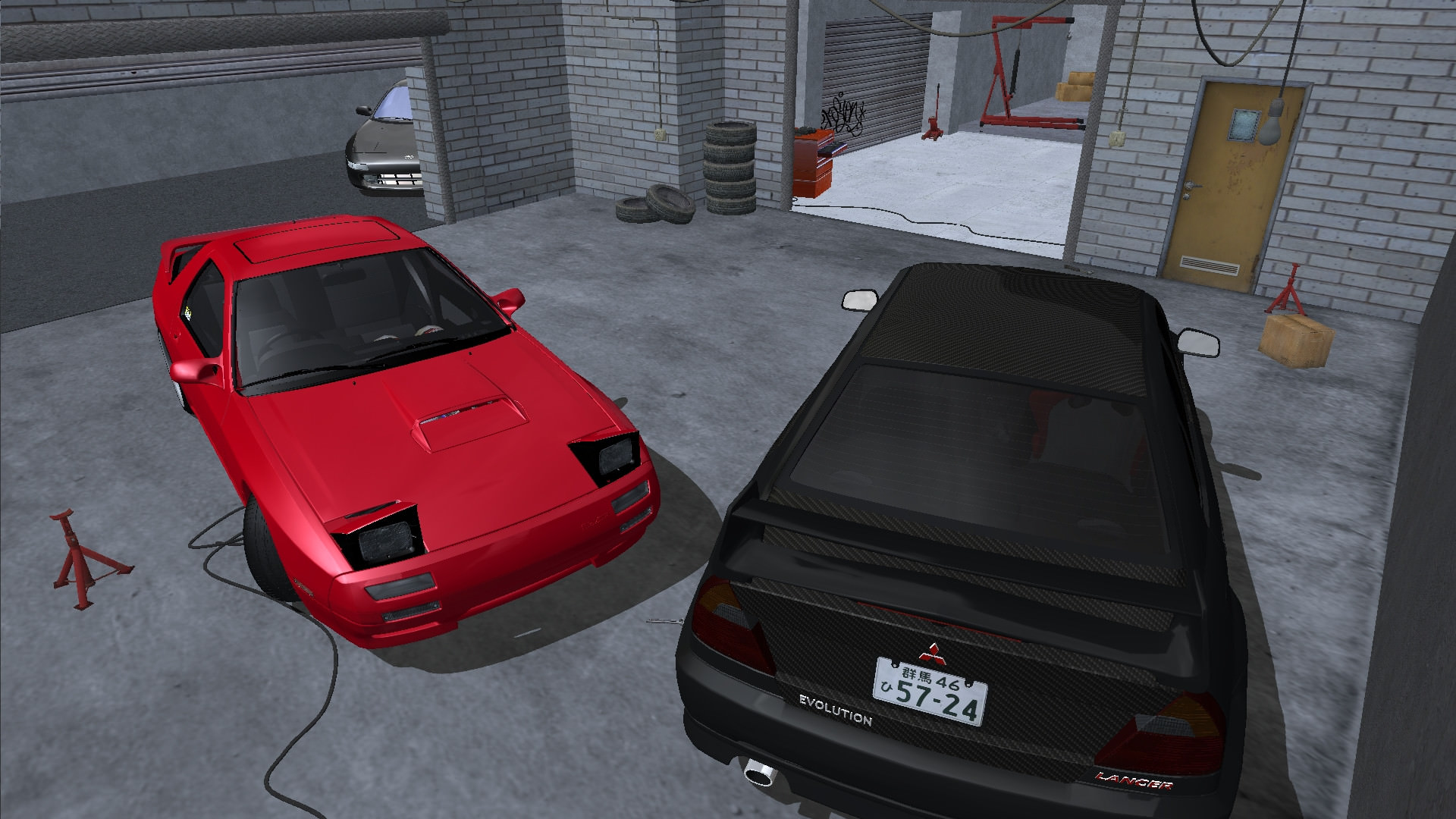
And here's a screenshot that I found a few threads back, which looks absolutely clean with minimal jaggies.
It could just be my bad cinematography but the muscle car picture looks noticeably cleaner than my own picture, and I have no idea how they did it.

Dec 31, 2017 3:28 pm
You don't.
SLRR with forced AF and AA at 1080p looks like shit still.
You need at least 1440p or 4K. The pictures you are looking at were taken at higher resolutions and downsampled to 1080p in photoshop or something else, but SLRR is a bitch to run and higher res, I used to run it at 4K or higher but I forgot how I did that and can't do it again, so someone else should help you, and me since I'm interested in getting it to 4K without giving an error again.
Topic starter
Dec 31, 2017 3:30 pm
I hear you. I need to make some screenshots for a racing roleplay forum that I'm in (it's a private Discord server) so I took the liberty of recreating some of the cars the members have. The SW20 and the Evolution are the two admins' cars, while the FC3S is mine.
I wonder how well SLRR will run on 1440p on a 750Ti. Probably not well, but I have to try.
Dec 31, 2017 3:34 pm
Try an ENB like this
I use it and with a good bit of zoom turns out like this:
Added 1 minute later:
uuhhhh DHR? Kinda everyone uses 1080p, I use it myself and I have no aa issues. 1080p is well enough for photos, all you need is zoom.
Dec 31, 2017 3:39 pm
No dude, just no 1080p still has a shit ton of jagged edges, and too much zoom in SLRR causes extreme z-fighting. At least for me, no matter what 1080p never looks good in my SLRR.
Anything sub 1440p is still jagged edges and unsmooth pictures. I prefer to go 8K actually but SLRR won't allow that. And yes game won't run good at that resolution, but it's not for playing. I usually play on windowed 1280x720p and use high res only for pictures.
Dec 31, 2017 3:52 pm
If you need to go 8k for no jagged edges you have a problem. I take all my pics in 1080p and they never have jagged edges.
This pic has multiple cars in it and still has no jagged edges and it's in 1080p. Resolution like 8k is unnecessary, especially is SLRR of all games.
Topic starter
Dec 31, 2017 4:40 pm
I used Dynamic Super Resolution using Nvidia Control Panel, and the picture quality improved a little bit but not by much, even on 4x native resolution. It's still better to go 1440/4k resolution.
Dec 31, 2017 4:49 pm
1440p/4k makes the game super unstable. Try the enb I linked, it has SMAA which improves jagged edges a lot. Pair it with some zoom and you will see massive improvements.
Dec 31, 2017 4:49 pm
Look at the S13 roof and door area, there's plenty of jagging and the IQ of the picture is not that great. Obviously way better than what usually comes.
Dec 31, 2017 4:52 pm
Which picture? IQ of the picture?

Dec 31, 2017 7:28 pm
I think super sampling trought GPU would help a lot and not make the game unstable

Dec 31, 2017 9:08 pm
# ShadoWPhoeniX :
So here's a screenshot I took with SLRR Light Edition (which people claim to be the best):And here's a screenshot that I found a few threads back, which looks absolutely clean with minimal jaggies.
It could just be my bad cinematography but the muscle car picture looks noticeably cleaner than my own picture, and I have no idea how they did it.
That mustang pic is mine and since you liked, i may tell you what i do, to make the pics looking clean. (Btw, my pc specs are kinda low, i use a monitor that is 1440x900 and just a 9500GT by geforce)
First of all, don't even think of running slrr in window mode, unless you use a potato has a computer.
Second, the Enb that i used to take that pic you showed, was the "Better Everything Sweet FX" (That can be found in DL section)(But i don't recommend you to use it and i will explain why a few lines below)
Third, if you have a nvidia video card, you'll need to force AA (Mine are set to maximum), 'cause the original AA of slrr looks like crap.
Fourth, run slrr in your native screen resolution (Mine are 1440x900, so i programmed to run in that res.), if you do this you should be fine.
Fifth, if you don't have a powerful PC, prepare yourself, 'cause slrr will run with 20fps or less.
Sixth, be patient, usually i take around a half an hour to build just one car. And the other half of hour, taking pics.
Seventh, don't use any other slrr besides BB93's one to take pics. The one he made is the best. No wonder he's the boss. (Just use the other ones if you are looking for a real gameplay, like racing or build for fun.)
Eighth, here's a recent pic i took Spoiler: , the ENB i used for that pic is the one made by doge's (Can also be found i DL section). Use the one made by him (doge), 'cause the "Better Everything Sweet FX" can't handle slrr too well, and by that i mean it still looks like the raw slrr.
Ninth, if you use a lot of mods, the game might crash a few times (Slrr if very unstable), if it does, just restart it. (Remember to always save your car by, exiting your career and reloading it)
Tenth, personally i think there's nothing wrong by taking pics directly in slrr (Pressing F12). But at this point you should decide which way is the best for you.
If you have any more questions or doubts, just PM me for further information.
Page 1 / 3
Next