Forum
Questions, builds, help and the odd argument. The mods and guides are out front.
Notifications
Clear all

Mar 31, 2018 8:54 pm
Yeah I know I've made that long time ago Boss so that's why I'm asking to Amilmand, he might know if it possible to add that feature to the .exe

Topic starter
Apr 1, 2018 11:42 am
Ah that really is not worth it...
Of corse it's plausible but there is no graphic in the font for the gears for a 7th (or up) and as you already found out the engine considers the 7th to be the reverse and things get messy if you try to play with that this is very unintended by the game designers, for a manual shift alright but to make the AIs aswell the automatic shift control able to use it, way too much work introducing potential bugs, I also dont really see the reward to risk introducing even more instability in the game.
But from the players perspective: I think the "current" ratio and the "current" gear number is directly editable with the chassis functions I introduced so for a custom GUI (which must be made for this scenario anyway as the original OSD doesn't even define a texture for the 7th gear) and a custom transmission there is no limit on the number of gears; you can set it to 2nd and let the automatic or manual control shift the gears up or down force it back to 2nd but change the ratio and the custom GUI to display the correct gear for the given ratio.
(you can even make a "continuous" transmission changing the ratio every frame for maximum torque (I hope I used the correct notions))

Apr 2, 2018 12:23 am
Do you think about moving or changing anything about slrr control support? the control works very badly in slrr, and changing that could give a new life to slrr, better gameplay, etc. (sorry for the english of google translator)
Topic starter
Apr 2, 2018 4:15 am
I dont know how slrr is inferior in controller support as I dont have a controller and I dont generally play racing games so I wouldn't know when the control feels right. I heard there is someone who added xinput for win10 maybe you are looking for that (LINK) but as I said never tested this.
Also there are numerous settings in the advanced control settings with those you ought to be able to customize your experience to your liking.
But if there is something specific that is not already in the game like a factor to modify how fast the given pedals are pressed I can look into it (though I think these particular factors are already in)

Apr 3, 2018 5:40 am
How can i enable the camera moving while in a part tuning menu like in SlrrExhaustive in other versions?
Topic starter
Apr 3, 2018 5:59 am
The tuning menu is built in the Mechanic.java in the
pre
function, you are looking for the line (in the stock Mechanic.java)
pre
Remove the DF_FREEZE flag from the flags.
Apr 3, 2018 6:20 am
Thanks for the fast answer. It really comes in handy, especially for making car mods 😃

Apr 10, 2018 1:53 am
In the last exhaustive bits download all cars objects just seem to bounce when there is collision is there a way to fix this and change it to default?
Topic starter
Apr 10, 2018 6:06 am
Oh. Correct thank you for telling me!
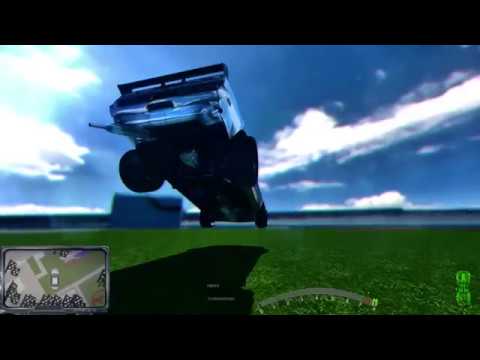
The CollisionForceMultVehicle variable was set to 10 (should be 1) in the exe so if you would be using the NoReshade version it would behave unnaturally I fixed this in the downloads but as it was a clear outlier in the settings I suspect you did not explore them: try the config program that came packed with the NoReshade version (SlrrExhaustiveSettingsEditor) and check what can be changed (while you are at it you can fix this error directly there by changing that particular (CollisionForceMultVehicle) variable to 1 and saving) for example I always hated how the cars bounce around when landing a jump (even a small one)... this can be remedied with the NativeSpring_Var5 (max inverse-contraction):
Apr 10, 2018 2:25 pm
Thanks. I never noticed the second tab in the editor
Topic starter
Apr 12, 2018 1:49 pm
I uploaded a new patch to the "Ever refreshing patchlink" for SlrrExhaustive
I made the Viper and S13 wings compatible with other cars and also added a new lookup giving back the names and descriptions of basic-parts that had their scripts stripped for stability. (a lot of parts had very basic names like "Bumper" and "Quarter Panel" most of these parts got their original name back)
Topic starter
Apr 12, 2018 8:03 pm
If someone downloaded the patch in the afternoon please download it again I failed to include a crucial file in the patch, downloading it again will fix the issue.
Thanks for adnan54 for pointing the error out 🙂

Jun 13, 2018 3:56 am
yo, i just got the slrr from you and now every time i launch it says not responding, please reply
Topic starter
Jun 13, 2018 9:46 am
The first launch can take some time because of the amount of files the game has to manage if you are not running it from an SSD wait at least 2 minutes.
If windows bothers you with a dialog that it is not responding click the "wait for the application to respond" (the last) option it eventually will.
If however it is the more simple stopped working dialog and you don't have the option to wait for the program to respond first thing first check the error.log maybe there is something there, secondly try and rename the d3d9.dll to something else (NOT_d3d9.dll for example)and hence disabling reshade because it can act up, later if you manage to get in the game once, you can enable it again for the next launch.
Also if you have reshade enabled don't try and force anything on the game form your graphics driver (nvidia control panel or equivalent) reshade will try and disable anything you try to add to it but it can fail and it's behaviour becomes undefined.
Also if you havent yet install the latest update: "Ever refreshing patchlink" for SlrrExhaustive
Topic starter
Jul 9, 2018 9:32 pm
I uploaded a small update to the patchlink of SlrrExhaustive I made the Impala fully paintable, and added the ability to scale roof scoops, extra parts, and wings (I could not find a big enough wing for said Impala and thought this to be the best way).
I also toned the reshade preset down a bit.