Forum
Questions, builds, help and the odd argument. The mods and guides are out front.
Notifications
Clear all

Dec 2, 2018 12:36 am
Is it possible to change the engine inertia according to the game FPS? Because at low FPS the engines seems to lost all the power and torque, and at high FPS the engines become overpowered and it is kinda frustrating..

Dec 2, 2018 2:04 am
# adnan54 :
Is it possible to change the engine inertia according to the game FPS? Because at low FPS the engines seems to lost all the power and torque, and at high FPS the engines become overpowered and it is kinda frustrating..
Ohhhh! This is why people tell me my engines are slow in their installation! 😮

Dec 2, 2018 11:14 am
that's the same issue as a lot of game had these days, like Fallout 76 for the example.
would be hard imo. But not impossible since amilmand's is here ;D

Dec 2, 2018 6:41 pm
Its not about the engines. At high fps the entire game is faster. Ive got a 144hz display and had to limit @ 70fps just because at 144 game goes too fast for everything, engine accel, braking, camera movement, etc

Dec 21, 2018 11:18 pm
Hello, i'm new into this, sorry if im just asking for something very common but i cant find an answer for my problem, so here it goes.
I'm trying to add cars via moving the _data and .rpk file into the racers folder but they wont ever show up in game, how can i solve this?
Dec 22, 2018 1:34 am
Are you looking in the car dealer? Because the car dealer doesn't refresh for a couple of in-game days. Most of the time, you have to buy new cars through MWM's vehicle catalog.

Dec 26, 2018 5:57 pm
# amilmand :
I was kind of intrigued so I went ahead and made a DynamicRim whose size (width and radius) and appearance can be "tuned" furthermore I added a DynamicTyre to this DynamicRim with "tune-able" mesh, size and other params (the wheel params that can passed to the SetupTyre(..) function) the result is interesting 🙂 , I also maintained the paintability of the rims with a trick (I made a RenderRef with a texture array consisting of 10 of the same texture which is handily the paintable one, this ofcourse makes all textures the rim uses paintable even the reflection but reshade overwrites that so no harm done (well at least when reshade is active))
(For this(the dynamic mesh selection) to work I had to make a long list of valid mesh TypeIDs and renderRef TypeIDs for tyres and rims so the solution is not hmm portable but it can be done (and if we'll find a way to get the MeshID of a given renderRef in script it can be made portable aswell, nevertheless the method can easily be used for a single modded rim)I know it looks silly but at least now we CAN make it look dumb without much hassle.
I added this to the "Ever refreshing patchlink" for SlrrExhaustive
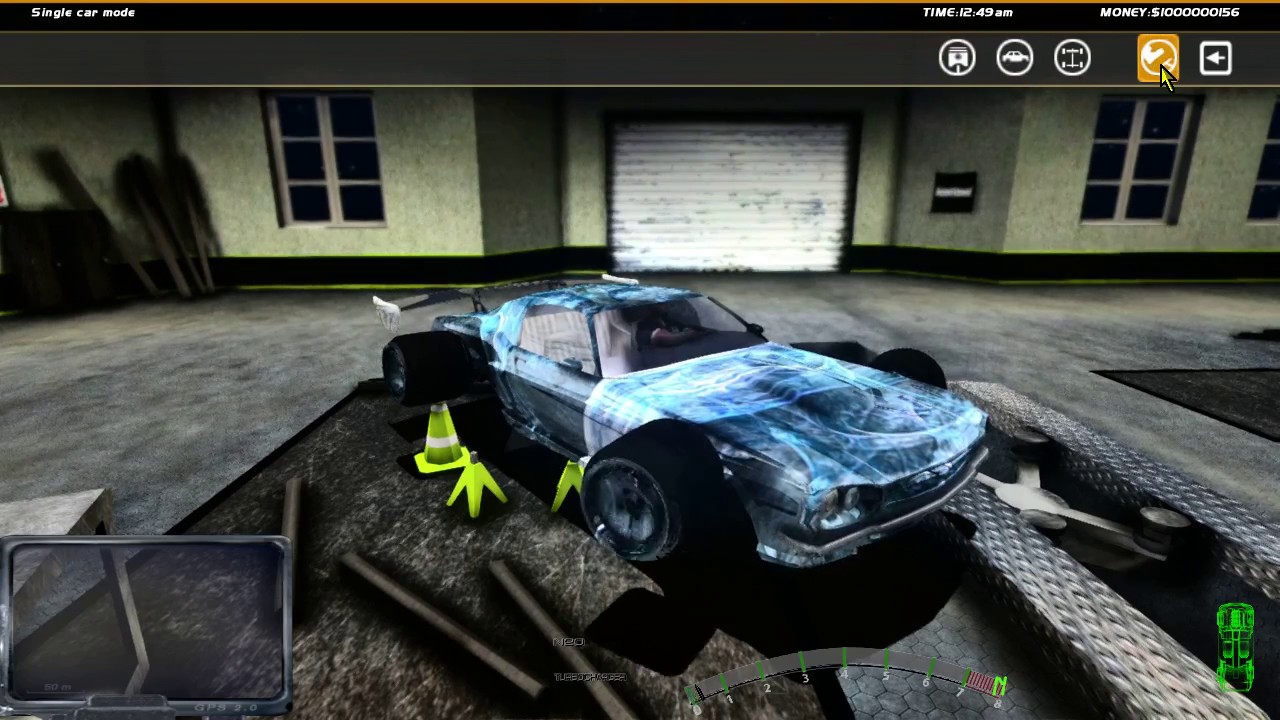
Sorry for bumping, but is it possible to have this feature as a standalone mod? 😃

Feb 4, 2019 1:46 pm
Sorry if it's a really noob question, but how hard would it be to get the depth buffer (and ui detection) from your reshade/exe working properly on 2.3.1?
Love all of the work you've done in this mod btw. Even for the Reshade alone, i've never seen someone other than the Reshade devs themselves put that much work into their own custom shaders.
Feb 5, 2019 7:28 pm
Does someone have his last reshade pack for MWM? The Google Drive link isnt working anymore :/
Feb 6, 2019 5:59 am
If you download it from the normal download link it should download all versions. Just checked that it works too.

Topic starter
Mar 26, 2019 10:07 pm
gorgoil wroteIs there any possible way to set part mass/weight by java? because I had an idea and I need to set weight by java to make it work.
Thanks in advance
No clue sry, the simulation part of the game is a right spaghetti.
But you can move the parts around with the slot positioning functions if perhaps you are trying to balance a car just a guess.
RedCarDriver wroteHey, sorry to bother you again, but do you have some idea what all of the variables in WheelRef.SetArm() and WheelRef.SetHub() do? The vast number of variables in there to test is intimidating. I figure "len" in there is probably length, but otherwise I have no idea.
I can only guess but
setArm( float len, float px, float py, float pz, float nx, float ny, float nz );I would think is
setArm( float lenght, float position_x, float position_y, float position_z, float normal_x, float normal_y, float normal_z );as in the position and the normal vector of the arm.
setHub( float len, float p1x, float p1y, float p1z, float p2x, float p2y, float p2z, float pcx, float pcy, float pcz );As for the hub I would think the last three would be the postion_center vector coordinates.
adnan54 wroteIs it possible to change the engine inertia according to the game FPS? Because at low FPS the engines seems to lost all the power and torque, and at high FPS the engines become overpowered and it is kinda frustrating..
The global engine inertia factor is highjacked by reshade :/ so changes made by a raw memory edit would be overwritten in the reshaded version.
eduarbio15 wroteHello, i'm new into this, sorry if im just asking for something very common but i cant find an answer for my problem, so here it goes.
I'm trying to add cars via moving the _data and .rpk file into the racers folder but they wont ever show up in game, how can i solve this?
If you are trying to mod the Exhaustive version, sadly there is just no room left for more rpk-s to be added (and there are a lot of generated scripts,lists and whatnot which regulate the abundant number of mods so its in no way a cakewalk even if you would be ok to just switch something rather than to add).
IceD wroteSorry for bumping, but is it possible to have this feature as a standalone mod?
It operates on a list of the available rim and tyre models among other hacks so a plug and play version is not exactly possible.
th3cr4pm4n wrote[..]from your reshade/exe working properly on 2.3.1
Reshade works in conjunction with a considerably modified slrr.exe which reports some progress on predetermined events during render so not directly (I would need to modify the 2.3.1 exe which would be at the least a dick move to Raxxat and Silent at the most against regulations (on the account of it being a maintained version) :/ or well it could be considered a dick move anyhow.
adnan54 wroteGoogle Drive link isnt working anymore
Yeah someone had the audacity to flag it for abuse... I reuploaded it and refreshed the download page.
I merged the Slrr Exhaustive patch into the main download and added some small features:
You can earn bonus money on tournaments for air-time and drifting, and I added a Fresnel factor for the reflection to tone it down a bit.
Spoiler:
Before:
After:
Mar 27, 2019 1:09 am
Nice to see you again!
# amilmand :
The global engine inertia factor is highjacked by reshade :/ so changes made by a raw memory edit would be overwritten in the reshaded version.
Since reshade overwrite the engine inertia factor, isn't it possible to reshade itself change the engine inertia factor automatically?
This bring me to another question: is it possible to make a "light" version from reshade with only the physics parameters (and the yaca/any motion blur effect)? because even with all effects disabled my potato computer still cant pass 15fps when reshade is instaled..

Mar 27, 2019 1:36 am
# adnan54 :
Nice to see you again!Since reshade overwrite the engine inertia factor, isn't it possible to reshade itself change the engine inertia factor automatically?
This bring me to another question: is it possible to make a "light" version from reshade with only the physics parameters (and the yaca/any motion blur effect)? because even with all effects disabled my potato computer still cant pass 15fps when reshade is instaled..
I just removed the effects I don't use by deleting the .fx file of them and removed them from the main reshade ini file
Added 4 minutes later:
# amilmand :
No clue sry, the simulation part of the game is a right spaghetti.
But you can move the parts around with the slot positioning functions if perhaps you are trying to balance a car just a guess.
Good to see you around again, no that doesn't help to my idea, my idea was to read a phys or a part weight and set the weight of that phys or part, due an idea I had, but I think it can be done in other way, instead of using the part you have it changes to other which already have that weight, probably it's going to be the best way, and thanks 😃
May 14, 2019 8:15 am
Is there any way to get each wheel's speed individually? Also, is it possible to disable a part collision ingame?
Topic starter
May 19, 2019 7:08 pm
adnan54 wrote[..]each wheel's speed individually[..]
WheelRef whl = player.car.chassis.getWheel(0);//the order used by the stock cars: 0:front_left 1:front_right 2:rear_left 3:rear_right (I think)
RawEdit.getF(whl.ptr+0xC0);
Will tell you a value proportional to the angular velocity of the front left wheel (if the given chassis has that one defined first).
This value is something that you can also set to add torque to the wheel: minuses will make the wheel rotate as to move the car forward and positive values will make the car go in reverse.
The value set manually with the RawEdit.setF function will fall off quickly so you would need to set it continuously for longer distances (to test it a value in the range of 1000 is enough to nudge a car a bit backwards:
WheelRef whl = player.car.chassis.getWheel(0);
RawEdit.setF(whl.ptr+0xC0,1000);
)
adnan54 wrotedisable a part collision ingame
That is tricky one would need to mess around with the instance hierarchy of the given part and somehow filter out the INSTANCE_PHYSICS resources which are indeed actual collisions and not a steering node or something like that...
I cant give you a usable solution for that.