Forum
Questions, builds, help and the odd argument. The mods and guides are out front.
Notifications
Clear all

Topic starter
Mar 10, 2018 5:00 pm
Right sure you could do this add a slot to the wheel and make a "blurred" part somehow and just add it on top of the base part.
Though making a blurred looking wheel with models and transparent textures could prove quite challenging.
A general solution is not yet feasible I dont think

Mar 10, 2018 5:37 pm
making a separate model wouldnt be an issue, can be easily made, so when achieved certain speed, the Wheel 3d model will change to the blurred one.

Mar 12, 2018 6:53 pm
Hi Amilmand, I've been trying to figure if there's any way to make the player car follow a spline, but till now nothing worked. Hope you know any way to make it! Thanks in advance. And about that crash I was having when the car hits hard on anything, it's not happening now with the last update you released

Mar 12, 2018 8:28 pm
# gorgoil :
Hi Amilmand, I've been trying to figure if there's any way to make the player car follow a spline, but till now nothing worked. Hope you know any way to make it! Thanks in advance. And about that crash I was having when the car hits hard on anything, it's not happening now with the last update you released
Should check valo city files as when you press S the car follows a spline in streets and sets a speed limit
Mar 12, 2018 11:29 pm
# svander :
Should check valo city files as when you press S the car follows a spline in streets and sets a speed limit
that's because of TRC files which sets the routes and speed limit on those parts by what Amilmand said before, and if it was that easy I'd probably figured out(I think) xD
Topic starter
Mar 12, 2018 11:47 pm
I posted the way to define splines not long ago LINK
You can make a bot follow a spline by the suitably named
public void followSplineTrack( float width, String splineFile, int oppCarId )function of the Bot class check out the bot.java from an original java pack (LINK) for other useful functions of this construct like the
public void createCar( GameRef map )and there usage either from the ROCTrack.java or if you have it the TournamentTrack.java of the SlrrExhaustive pack.
You can make the camera follow a bot car (TournamentTrack.java demo mode)
If you are after a way to modify the path on the fly with player input the only way for now is to decode the trc file
Mar 13, 2018 1:56 am
I've checked that post of you about splines but there's wasn't saying it was possible to make player car follow a spline, so I didn't checked it carefully, because make a bot follow a spline that's easy but now the player car I've been trying hard to make it work but the only thing I've got was crashes xD
Added 3 minutes later:
But if you think there's no way to make player car follow a spline via java like bots on ROC then I think I will forget my idea
Topic starter
Mar 13, 2018 3:21 am
You can but you would have to give the control of the players car away to a bot (only one controller can have control over a given car either player input or the bot) with a script like
Bot raceBot = new Bot( 0, 1, 1, 2.0, 2.0, 1.0);
player.controller.command( "leave " + player.car.id() );
raceBot.car = player.car;
raceBot.enterCar(raceBot.car);
raceBot.brain.command( "AI_BeginRace 1.0" );
raceBot.followSplineTrack( SplineWidth, "maps\\RaceSpl\\temp_spl_"+bot_i+".spl", 0 );
you would probably have to reset the camera aswell
You could perhaps monitor player input in a track's handleevent or similar method and give back control to the player upon keypress
raceBot.leaveCar(0);//traffic id should be 0
player.controller.command( "controllable " + player.car.id() );
Mar 13, 2018 2:31 pm
# amilmand :
You can but you would have to give the control of the players car away to a bot (only one controller can have control over a given car either player input or the bot) with a script likeBot raceBot = new Bot( 0, 1, 1, 2.0, 2.0, 1.0); player.controller.command( "leave " + player.car.id() ); raceBot.car = player.car; raceBot.enterCar(raceBot.car); raceBot.brain.command( "AI_BeginRace 1.0" ); raceBot.followSplineTrack( SplineWidth, "maps\\RaceSpl\\temp_spl_"+bot_i+".spl", 0 );you would probably have to reset the camera aswell
You could perhaps monitor player input in a track's handleevent or similar method and give back control to the player upon keypressraceBot.leaveCar(0);//traffic id should be 0 player.controller.command( "controllable " + player.car.id() );
it gives me this error:
!Mighty ERROR
Topic starter
Mar 13, 2018 3:48 pm
which line?
but it does work though doesn't it?
Mar 13, 2018 4:40 pm
doesn't says any line, just that, and it doesn't work
Topic starter
Mar 17, 2018 3:56 am
gorgoil wrotedoesn't says any line
believe it or not I myself saw that too...
The raceBot.enterCar(raceBot.car); is the line producing the Mighty Error because the Bot.world variable is null.
we need to set that to the map of the track you are putting this script into like:
Bot raceBot = new Bot( 0, 1, 1, 2.0, 2.0, 1.0);
player.controller.command( "leave " + player.car.id() );
raceBot.car = player.car;
raceBot.world = map;
raceBot.enterCar(raceBot.car);
raceBot.brain.command( "AI_BeginRace 1.0" );
raceBot.followSplineTrack( SplineWidth, "maps\\RaceSpl\\temp_spl_"+bot_i+".spl", 0 );
Though if it didnt work for you before it wont now either I just got the mighty error(I just didnt check the error.log) and the car behaved as intended.
I also solved the last crash point(last at my end at least) in SlrrExhaustive, the one caused by the followSplineTrack, it was actually just the game opening the given spl file with no read-sharing and failing to close the file before the next iteration tried to open the same file again for another bot to follow, now in the Tournaments the bots copy the given spl for themselves with a unique name and reference that, this seems to work.
I updated the patch link.
(SlrrExhaustive Patch Link)

Mar 17, 2018 11:40 pm
Just a random question: Is it possible to turn the small map/gps navigator into a circle instead of a rectangle?
Topic starter
Mar 18, 2018 3:43 am
No
(the game defines the navigator as a viewport which is rectangular and then tiles the map texture on a very big plane so no not directly)
You can approximate the circle with some (3 in this case) rectangles though of course the error of the approximation induces a wider than "current trends would deem pretty" border.
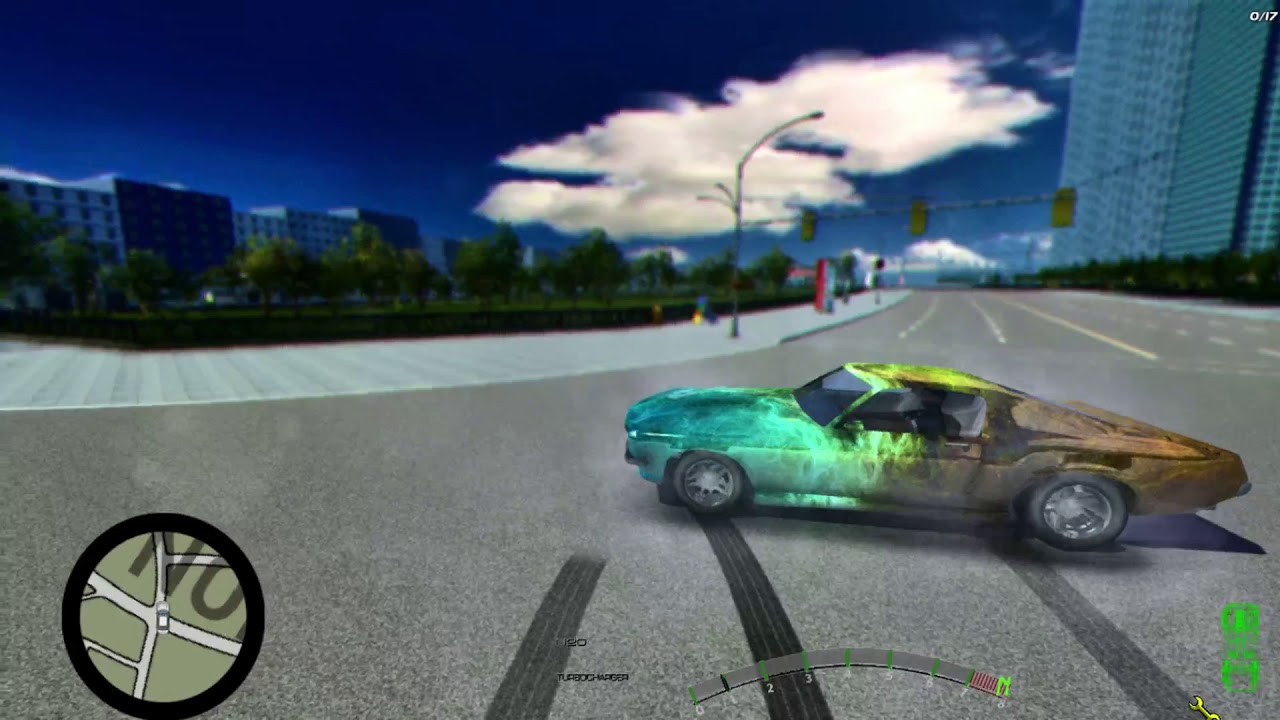
However this border could be used to show rpm, turbo and other info like in I dont remember which NFS that would make it pretty.
I created 3 navigators ensuring the correct ratios and relative positions (0.7071 is(~) sin(45°) 0.4871 is(~) -sin(22.5°) 0.8733 is(~) -cos(22.5°)) in the track like:
nav =  new Navigator( -23.482, -24.45, 5.828, maps.city.smallmap:0x00000001r,
	maps.city.smallmap:0x00000002r, maps.city.smallmap:0x00000005r, 8, 8, 8 );
nav2 = new Navigator( -23.482, -24.45, 5.828, maps.city.smallmap:0x00000001r,
	maps.city.smallmap:0x00000002r, maps.city.smallmap:0x00000005r, 8, 8, 8  );
nav3 = new Navigator( -23.482, -24.45, 5.828, maps.city.smallmap:0x00000001r,
	maps.city.smallmap:0x00000002r, maps.city.smallmap:0x00000005r, 8, 8, 8  );
float aspectX = 0.09;
float aspectY = 0.16;
float scale = 1.78;
float initialX = 0.44;
float initialY = 2.66;
nav.changeSize(  aspectX*scale*(initialX), aspectY*scale*(initialY),
	aspectX*scale*(0.7071), aspectY*scale*(0.7071) );
nav2.changeSize( aspectX*scale*(initialX+(0.7071-0.4871)/2.0), aspectY*scale*(initialY-(0.8733-0.7071)/2.0),
	aspectX*scale*(0.4871), aspectY*scale*(0.8733) );
nav3.changeSize( aspectX*scale*(initialX-(0.8733-0.7071)/2.0), aspectY*scale*(initialY+(0.7071-0.4871)/2.0),
	aspectX*scale*(0.8733), aspectY*scale*(0.4871) );
The zoom is viewport-height dependent so the animate block also needed updating:
nav.updateNavigator( player.car );
nav2.updateNavigator( player.car );
nav3.updateNavigator( player.car );
nav.cam.setMatrix( new Vector3(CamPos.x/100, GPS_Min_Zoom + Speed, CamPos.z/100),  new Ypr(Rot, -1.57, 0.0) );
nav2.cam.setMatrix( new Vector3(CamPos.x/100, (GPS_Min_Zoom + Speed)*1.236, CamPos.z/100),  new Ypr(Rot, -1.57, 0.0) );
nav3.cam.setMatrix( new Vector3(CamPos.x/100, (GPS_Min_Zoom + Speed)*0.69, CamPos.z/100),  new Ypr(Rot, -1.57, 0.0) );
Thats basically it.
(I also replaced the GPS frame with a circle with the correct size for 16:9)
Mar 18, 2018 5:29 am
Pretty interesting! I never thought in create a circle using 3 squares/rectangles (at least not in scripting). Thanks for sharing