Forum
Questions, builds, help and the odd argument. The mods and guides are out front.
Notifications
Clear all

Topic starter
Mar 8, 2018 4:43 am
wothout the reshade it does the same thing. it might be the slrr_gl.exe itself

Mar 8, 2018 4:48 am
Ok that is some progress then.
Try this one (LINK) still with no d3d9.dll in the slrr root
Topic starter
Mar 8, 2018 5:22 am
still crashes when it hits max memory
EDIT:
does the same thing with the "NoReshade" patch you put out.
ANOTHER EDIT BUT GOOD NEWS:
i removed a rimpack that seemed to take a while to load anyways and went through all the rim sizes. the game is now holding just underneath 3.5gb to the point where it isnt crashing.
Mar 8, 2018 2:49 pm
Allight then I think this is standard operation you just have some big models and the patched exe tries to keep them in memory to help mintaian fps (in the tracks this is very helpful).
nevertheless you can force the memory cleaning in the catalog
Add this to the catalog.enter()
RawEdit.setI(0x00618670,1);and this to catalog.exit()
RawEdit.setI(0x00618670,0);use the d3d9.dll and the Slrr_GI.exe that came with the patch and it will force the memory to minimum in the catalogue aswell.
Topic starter
Mar 8, 2018 10:30 pm
what's the file that i place these in?
Mar 9, 2018 8:36 am
sl\Scripts\game\src\catalog.java
in the function enter()
and exit()
Topic starter
Mar 9, 2018 6:39 pm
im trying to find the line for "function enter()" or "catalog.enter()" in the java but it doesn't seem to be there.
Mar 9, 2018 6:52 pm
The default mwm catalog.java is line 386
default vanilla catalog.java is on line 320
each of them reads:
public void enter( GameState prev_state )
Topic starter
Mar 9, 2018 7:32 pm
it was at line 409. and it uhhh crashed. did i enter it right?
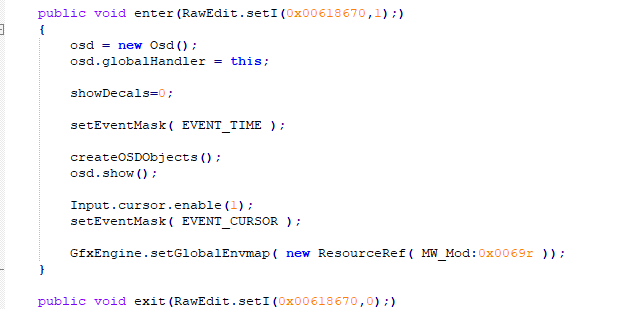
Mar 9, 2018 8:01 pm
No no
This part of the function definition between the {}-s is the function body we want the action to be preformed when the function is called and that part is just that, the function body between the {}-s
like
public void enter( GameState prev_state )
{
  RawEdit.setI(0x00618670,1);
  ...
Topic starter
Mar 9, 2018 9:15 pm
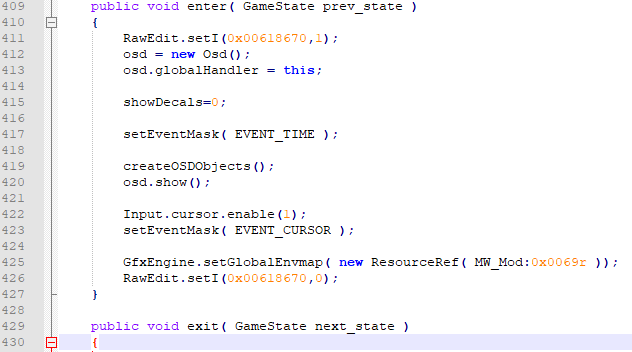
so here's the deal currently, i loaded in all my cars and a couple rims (loaded the cars from the garage car selection) which led my game to around 2.5gb. I then did what I normally do and scrolled through the rims catalog trying to get to the end of it. Sure enough, the game got flooded with data and crashed at 3.5gb. i think the lies that we added only slowed down the data "overflow" by a little bit and i'm not sure what to do now. Anything else you could suggest?
(screen cap of my lines just to be sure i did it right)
Mar 9, 2018 10:15 pm
the
RawEdit.setI(0x00618670,1);should only go to the enter function
the
RawEdit.setI(0x00618670,0);line only to the exit.
This line sets the "limit memory to a minimum mode" on hence the ...,1)
RawEdit.setI(0x00618670,1);This line sets the "limit memory to a minimum mode" off hence the ...,0)
RawEdit.setI(0x00618670,0);you want to minimise the memory when the enter() is called but the exit() is not yet or as when you are in the catalog
Also you will need the d3d9.dll named like that as this is enforced by reshade.
Topic starter
Mar 10, 2018 2:48 am
ngl this is getting pretty confusing for me because i cant scrip java if my life depended on it. also i didnt get a clear response, sorry. what am i naming the d3d9.dll again? i also didnt get a clear response on that either.
Mar 10, 2018 3:29 am
post the catalog.java to pastebin and post the link here I'll write the two lines in.
there is a file named d3d9.dll in the patch/reshade-mod (SlrrExhaustive Bits) you downloaded that file needs to be in the slrr root directory next to the Slrr_GI.exe file when you run the game with the Slrr_GI.exe for this(the new catalog.java) to work
Topic starter
Mar 10, 2018 5:52 pm
sorry for the late response, i was out for a while and fell asleep lol
here you go tho:
https://pastebin.com/Ju85ngVc