Forum
Questions, builds, help and the odd argument. The mods and guides are out front.
Notifications
Clear all

Topic starter
Mar 14, 2013 6:09 am
This screenshot is so smooth and beautiful..

Mar 14, 2013 6:20 am
Get a really nice PC and mess around with ENB

Mar 14, 2013 8:12 am
not that much to do with nice pc 🙂 ENB is big BS too.
its more to do with the reflections, photoshop editing and your skills in photography!
francos shot AFAIK will be stock slr with new reflections + some photoshop with brightness/contrast etc adjusted.
you can/need to force AA(google it) so you have a "smoother" looking game.

Mar 14, 2013 12:11 pm
JC My photos weren't touched with photoshop. Just play with GPU settings and get FXAA Tool. LINK TO FXAA Tool
Mar 14, 2013 12:36 pm
i was commenting on francos picture 🙂
Mar 14, 2013 12:38 pm
Ahh ok 🙂
Topic starter
Mar 14, 2013 6:35 pm
# Jesus Christ :
not that much to do with nice pc 🙂 ENB is big BS too.its more to do with the reflections, photoshop editing and your skills in photography!
francos shot AFAIK will be stock slr with new reflections + some photoshop with brightness/contrast etc adjusted.
you can/need to force AA(google it) so you have a "smoother" looking game.
What is ENB? And how can i get the ENB settings? Thx Jesus Christ
Added 3 minutes later:
# E-Bullet :
JC My photos weren't touched with photoshop. Just play with GPU settings and get FXAA Tool. LINK TO FXAA Tool
I have allready download the link about FXAA Tools. How to use that? Thx E-Bullet

Mar 14, 2013 6:41 pm
Ignore ENB. 🙂
Mar 14, 2013 7:14 pm
# adha77 :I have allready download the link about FXAA Tools. How to use that? Thx E-Bullet
FXAA doesn't work with ENB. Check Anti Aliasing in FXAA Tool and check every setting for yourself. Use ToneMap to adjust image color, darkness, etc. Just make sure to make fog white. Then in ToneMap panel adjust Gamma (Max minimum for me), Exposure (For lightness. Works sort of like Gamma, but looks better), Saturation (For color), Bleach (Just as it says), Fog (If you have made fog color white, then when going to maximum you'll get darker image. Combined with exposure settings you can get some kick ass shots.), Blueshift (Just makes image blue. Don't use that). My advice is just to try everything for yourself. Pause/Break key will turn on or off enhancements in game. Use Split screen to see before/after image.
P.S. If you have or had ENB make sure to delete all files of enb or sweetfx. And find reflections that you like.

Mar 14, 2013 7:24 pm
ENB series works with FXAA tool
You need to add the ddl file from the FXAA tool in the proxy from the enbseries.ini
like that:
[PROXY]
EnableProxyLibrary=1
InitProxyFunctions=1
ProxyLibrary=d3d9-fxaa.dll
@adha77 if you don't use PS it's all about lighting,backgroud and reflections, if these three fit you can make nice shots and even more if you have a good cpu
how you build the cars and take the shots is another story😃

Mar 14, 2013 8:10 pm
enb is no good for most people fxaa seems to be a good tool but i use sweet fx because i find it doesnt use as much memory as the other two
but i just use the SMAA Anti-aliasing to smooth the edges because as as said above reflections and lighting make the shots you dont need fancy effects realy
iv only got a generic intel pentium laptop and get shots like this
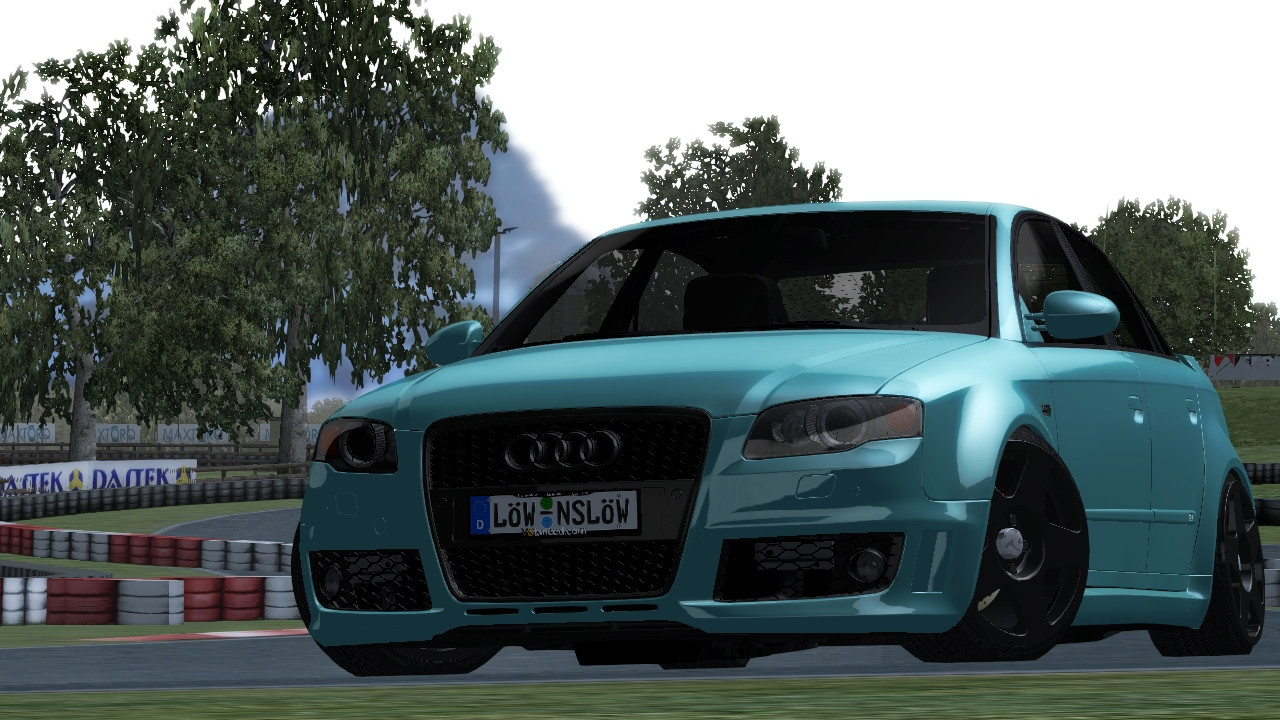
just try out diffrent reflections and one of the above untill you get what your looking for

Mar 14, 2013 11:05 pm
how this any suggests??
Mar 14, 2013 11:15 pm
Need AA badly :/
Mar 15, 2013 12:42 am
this is what i have AA on
Topic starter
Mar 15, 2013 6:14 am
# E-Bullet :
FXAA doesn't work with ENB. Check Anti Aliasing in FXAA Tool and check every setting for yourself. Use ToneMap to adjust image color, darkness, etc. Just make sure to make fog white. Then in ToneMap panel adjust Gamma (Max minimum for me), Exposure (For lightness. Works sort of like Gamma, but looks better), Saturation (For color), Bleach (Just as it says), Fog (If you have made fog color white, then when going to maximum you'll get darker image. Combined with exposure settings you can get some kick ass shots.), Blueshift (Just makes image blue. Don't use that). My advice is just to try everything for yourself. Pause/Break key will turn on or off enhancements in game. Use Split screen to see before/after image.
P.S. If you have or had ENB make sure to delete all files of enb or sweetfx. And find reflections that you like.
When I want to install the FXAA Tools
Page 1 / 2
Next